
Decor Matters: Home Design App
DecorMatters, Inc.House & Home
2.922.00 Reviews
- Version
- 1.5.2
- Installs
- 50.00K
- Age Rating
- Everyone
Screenshots

Our Review of Decor Matters: Home Design App
 Analysis by Appyee
I like home-design apps most when they help me make a decision I can use outside the screen, rather than simply filling an afternoon with pretty rooms. Decor Matters sits between a creative design toy and a practical planning aid: I can experiment with a space, get ideas from other people, and think through possible changes before moving furniture or shopping. Its house-and-home focus is clear, though I’d treat its visual previews as inspiration and planning support, not a substitute for checking real measurements and finishes.
What feels quick, and what can slow a session down
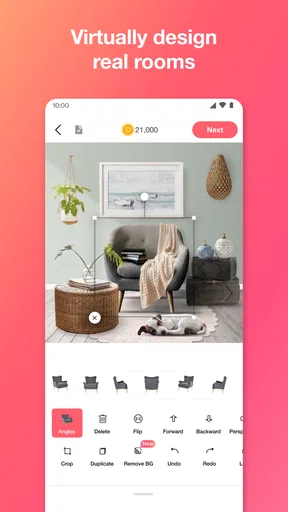
My first impression is that the experience is designed to get me into a project without a long learning curve. The layout is approachable, and the drag-and-drop approach makes trying a different arrangement feel less intimidating than starting with a blank page in a professional design program. That matters if I only have a few minutes and want to test a colour or furniture placement before getting on with my day.
The pace can change when I move from browsing into more involved visual work. A room with several objects, camera-based viewing, or a design challenge asks more of a phone than casually looking through ideas. I would not assume that every screen will feel equally immediate on every device; a busy project can involve more loading and interaction than a simple browse. For a smoother session, I’d begin with one room and a small number of major pieces, then add detail once the layout feels right.
That workflow is useful for more than avoiding clutter on screen. It helps me separate the big decision—where the sofa, bed, or table belongs—from smaller choices such as accessories. If the basic arrangement does not work, I can change it before spending time decorating around it. Start with the pieces that determine how the room functions, then use decorative items to refine the mood.
When a project gets demanding
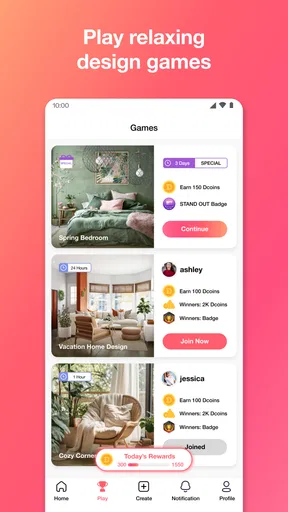
The app’s appeal is that it brings several kinds of activity together: arranging a room, exploring visual ideas, interacting with other people’s projects, and taking part in design challenges. That variety can make a session lively, but it also means I would not judge performance from one quick launch. Browsing a community feed is a different kind of use from manipulating objects in a room or trying to view an idea in the space around me.
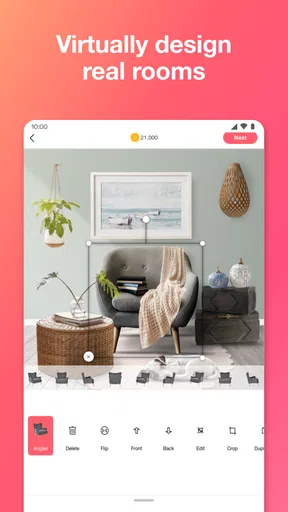
For a realistic example, imagine I am considering whether a reading chair will fit beside a window. I can use a project to try the chair in that part of the room, compare the overall balance with the existing layout, and ask someone whose taste I trust to look at the idea. Before buying anything, I would still measure the wall, check the chair’s actual dimensions, and think about the route through the room. The app can help me spot a promising arrangement; it cannot make those practical checks unnecessary.
AR-style placement is especially easy to over-trust because seeing an object in a familiar room feels persuasive. I’d use it to answer broad questions—does this shape overwhelm the corner, or does the colour sit comfortably with the room?—rather than to make a final call about exact clearance, scale, or material. Lighting, camera perspective, and the display itself can affect how a virtual item appears. A useful habit is to treat the preview as a first filter, then verify any purchase decision in the real room.
Reliability and a sensible way to save effort
I value a design app most when it lets me return to a decision without having to reconstruct my thinking. For that reason, I’d make changes in deliberate stages: settle the room’s main layout, look at it as a whole, and only then make smaller adjustments. This makes it easier to tell whether a new piece improves the design or merely adds visual noise. It also limits the frustration of changing several elements at once and then not knowing which change made the room work better.
When I’m collaborating, I would share a focused question rather than ask for a vague verdict on an entire room. For example, I might ask whether two seating arrangements leave the space feeling open, or whether a particular accent colour competes with the main furniture. A second opinion is most useful when the choice is specific. Community inspiration can broaden my taste, but another person’s attractive room may have different dimensions, natural light, and everyday needs from mine.
As with any app involving visual content and active interaction, I’d keep expectations practical on a long session: a device can feel warmer or less responsive when it is handling more demanding work, and individual performance may vary. If a project becomes sluggish, I’d pause, close other demanding tasks, and return to the simpler part of the design rather than repeatedly adding detail. That is a cautious general approach, not a claim that every user will encounter a particular fault.
Who will enjoy it, and who may prefer another tool
I can see Decor Matters working especially well for someone who wants to learn by experimenting. Beginners can try different arrangements without committing to a purchase, while people who already enjoy interior design can use the challenges and community projects as a creative prompt. It also suits anyone who finds a plain mood board too passive and would rather interact with an idea in a room-like setting.
It is less suitable as the only tool for a renovation with strict dimensions, construction constraints, or a detailed materials budget. In those situations, a dedicated floor-planning tool, a spreadsheet, or a conversation with a design professional may be more dependable for the precise work. A general shopping app may also be better if the main goal is simply to find an item and compare its current specifications. Decor Matters is strongest when I want to explore possibilities, not when I need technical documentation or a guaranteed match between an on-screen object and a product in a shop.
Compared with a conventional inspiration board, its interactive room planning gives me more of a sense of how objects relate to one another. Compared with professional design software, it feels more approachable and playful, but I would not expect the same level of measured control. That trade-off is central to deciding whether it is right for me: it lowers the barrier to trying ideas, while leaving the most exact planning to other methods.
Cost, compatibility, and what to expect
The app is free to download, with optional in-app purchases ranging from $0.99 to $79.99 per item. I’d explore the free experience before buying anything and pay attention to what an optional purchase actually adds to my own use. The spread makes it sensible to avoid assuming that every creative feature or item will be included at no cost. If I only want occasional inspiration, I’d be especially careful not to spend just because a design challenge makes an extra purchase feel tempting.
Decor Matters is made by DecorMatters, Inc. and is rated for everyone. It was released on August 15, 2024, and version 1.5.2 requires operating system 9 or later. Its average rating is 2.9 from 145 ratings, with 22 written reviews, and it has passed 50,000 installs. Those figures give a prospective user a useful sense of its modest reach and mixed reception, but they do not tell me whether it will suit my own device or design habits. I’d check compatibility first and approach the app with realistic expectations rather than assuming a universally smooth experience.
One practical question is whether I need professional design knowledge to get started. I don’t think so: the appeal is trying arrangements and learning what looks balanced through iteration. Another is whether it can settle a real buying decision. It can help narrow down an idea, but I would still confirm dimensions and product details independently. And if I mainly want a polished technical plan, I’d choose a more specialized tool instead of asking a playful home-design app to do that job.
Getting Started with Decor Matters
First off, let's talk about the user-friendly interface. As soon as you open Decor Matters, you're greeted with a sleek, modern design that's super easy to navigate. No getting lost in a sea of buttons here. The app has a clean layout, making it straightforward to find what you need.
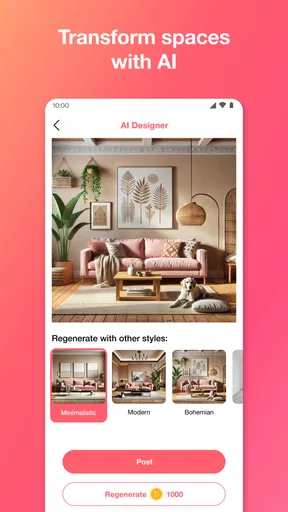
Once you're in, you can dive right into designing. The app offers a plethora of features that allow you to bring your dream home to life. Whether you're working on a single room or an entire house, the app's tools make the process a breeze. One of the coolest features is the augmented reality (AR) tool. Seriously, being able to visualize how a piece of furniture will look in your space before buying it is a game-changer.
Exploring the Features
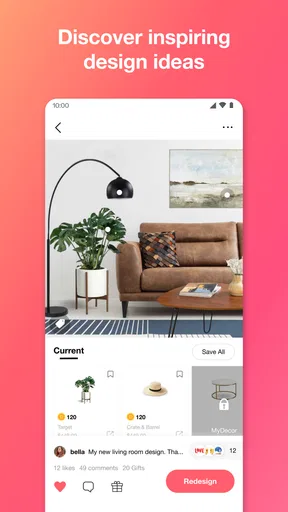
Now, let's get into the nitty-gritty of what Decor Matters offers. You can choose from a wide variety of furniture and decor items, all from top-notch brands. The app updates its catalog regularly, so you're always up-to-date with the latest trends.
- AR Visualization: This is hands-down one of my favorite features. Using your phone's camera, you can place virtual furniture in your actual space. It's like having a personal designer in your pocket.
- Collaboration: Got a friend who loves design as much as you do? You can invite them to collaborate on your projects. This feature is super handy if you're co-designing a space or just want a second opinion.
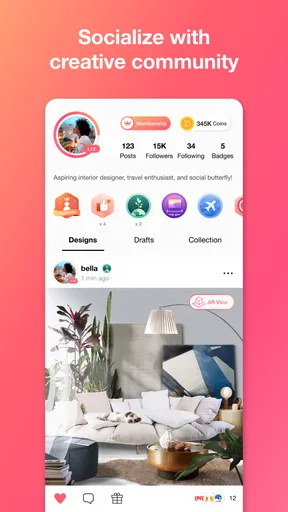
- Community Inspiration: Sometimes, you just need a spark of inspiration. The app's community section lets you browse through other users' projects. It's like Pinterest, but more interactive.
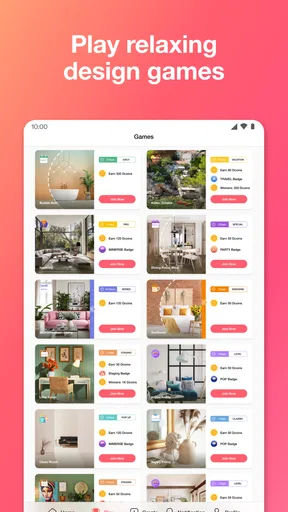
The app also has a fun gaming twist. You can participate in design challenges and earn rewards, which adds an exciting layer to the whole experience. Who knew designing could be this rewarding?
User Experience and Design
Now, let's chat about the overall user experience. The app is pretty intuitive, which means you don't need to be tech-savvy to use it. The drag-and-drop functionality makes designing hassle-free. Plus, the tutorials and tips sprinkled throughout the app are super helpful. It's like having a little guide whenever you feel stuck.
The design of the app itself is worth mentioning too. It's aesthetically pleasing, with a color scheme that's easy on the eyes. Navigation is smooth, and loading times are quick, so no waiting around when you're eager to see your ideas come to life.
Final Thoughts
All in all, Decor Matters is a fantastic app for anyone looking to spruce up their home. Whether you're a seasoned designer or just starting out, the app offers something for everyone. The blend of creativity, technology, and community makes it stand out in the world of design apps.
So, if you're itching to redesign your space or just want to play around with some decor ideas, give Decor Matters a whirl. Who knows? You might just discover a hidden talent for interior design. Happy decorating!
Verdict
Strengths of Decor Matters: Home Design App
- Intuitive interface for easy navigation.
- Wide variety of design themes available.
- Augmented reality feature enhances creativity.
- Regular updates with new furniture collections.
- Community sharing boosts inspiration and ideas.
Limitations of Decor Matters: Home Design App
- Some features require in-app purchases.
- Occasional lag in augmented reality mode.
- Limited offline functionality.
- Ads can be intrusive at times.
- Requires high storage space on device.
Similar Picks in This Category
View All
Universal TV Remote Control
CodeMatics Media Solutions3.9

AlfredCamera Home Security app
Alfred Systems Inc.4.7

Planner 5D: AI Home Design
Planner 5D4.5

Universal Tv Remote-Cast to TV
One Music Player4.1

Zillow: Homes for Sale & Rent
Zillow Group4.8

99acres Buy/Rent/Sell Property
infoedge.com4.3
Frequently Asked Questions
What features does Decor Matters offer to enhance home design?
Decor Matters provides a range of features including augmented reality (AR) to visualize furniture in your space, a vast library of design elements, mood boards for planning, and a community platform for sharing ideas. These tools assist in creating and refining your interior design projects, making it easier to visualize changes before making actual purchases.
Is Decor Matters suitable for both beginners and professional designers?
Yes, Decor Matters caters to a broad audience. Beginners will find the intuitive interface and tutorials helpful, while professionals can benefit from advanced tools and community feedback. The app’s versatile features allow users at any level to explore and implement their design ideas effectively.
How does Decor Matters use augmented reality (AR) in its app?
Decor Matters uses AR technology to allow users to visualize how different pieces of furniture and décor will look in their actual space. By using your device’s camera, the app overlays digital images of furniture onto your room, giving you a realistic preview before making any purchases.
Is there a cost associated with using Decor Matters?
Decor Matters is free to download and use, but it offers in-app purchases and subscription options for premium features. These may include access to exclusive design elements, ad-free experiences, and enhanced project tools. Users can choose whether to upgrade based on their design needs and budget.
Can I collaborate with others on design projects in Decor Matters?
Yes, Decor Matters encourages collaboration by allowing users to share their projects within the app’s community. You can receive feedback, tips, and inspiration from other users. This feature is particularly useful for those looking to refine their designs with the help of a supportive and creative community.
